a modern editor inside your terminal
Your AI CLI deserves a real editor
Big prompts deserve better than a one-line input box. Quill brings a responsive Markdown editor to the terminal, giving code, logs, context, requirements, and constraints room to become clear, structured, and harder to misread. Make the model solve your problem—not decode your prompt. Compose, preview, and review at your own pace, then route the prompt you wrote to your AI coding CLI, a direct API, or your shell. No model-assisted rewriting. Just the editor surface your terminal was missing.
Make long, multiline, and multi-step instructions read like a prompt—not a blob.
Monthly or yearly access · secure Paddle checkout · every feature included
v0.12.11
macOS · Windows · Linux
one native binary · no runtimes · drafts and history stored locally
You've felt this
The prompt got serious. The input box didn't.
CLI composers are great for quick exchanges. But when a prompt picks up code, logs, context, requirements, and constraints, a compact input stops feeling like enough. Desktop AI apps, editors, IDEs, and plugins give that work room to breathe. Quill brings that same composing control to the terminal, a GenAI gateway, or any keyboard-first workflow.
$ ai
Welcome back. Type a prompt:
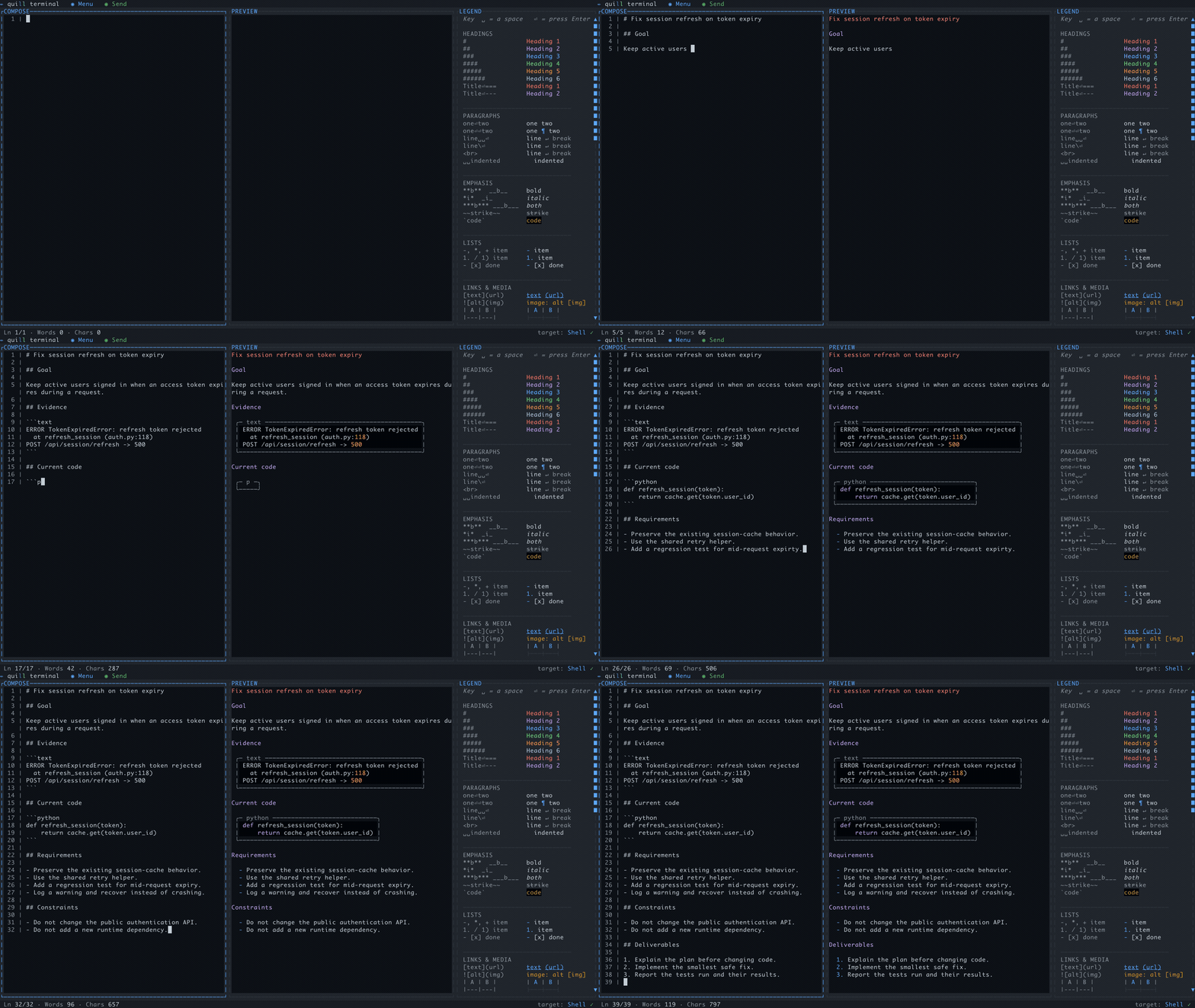
Now watch Quill Terminal turn the blob into a prompt you can inspect.
live preview…
Composing deliberately—nothing has been sent.
The surface shapes the prompt
Same intent. Much harder to misread. Easier to articulate.
Quill does not rewrite the prompt. It gives you the space and tools to compose prompts the right way. Give a developer a real editing surface and the prompt improves before the model ever sees it: logs become evidence, code gets fenced, assumptions get challenged, requirements become checkable, and rough edges get fixed.
AI desktop apps and IDE extensions already make room for that work—even when the same models sit behind them.
Why should the CLI get a one-line input box?
Quill brings the missing editor to the terminal, so CLI-first workflows get the same room to think, shape, and review.
See it in a real session (from Quill Terminal)
One reviewed prompt. Four provider paths.
The comparison above shows why the editing surface matters. Each tab begins at target selection, follows the prompt as it is written and corrected with live Preview, then shows the real provider result. The CLI recordings also include provider startup and output scrolling. These recordings show an earlier build; the current toolbar may differ.
Complete CLI session
Start Claude, compose naturally, then inspect the answer
Watch the target change, Claude Code start inside Quill, and the brief take shape in Compose while Preview renders it live. Timed captions call out the separate log and Python fences, requirements outside those blocks, the deliberate typo correction, review, handoff, Claude's genuine response, and Provider-pane scrolling.
01
One source document
Compose and review once. Change the target without rebuilding the prompt.
02
No model-assisted rewrite
The provider receives the structure you approved, including code fences and lists.
03
The session stays beside it
CLI output or direct API results remain in Quill's Provider pane for inspection.
Watch the complete editor and provider workflow
Silent and captioned: compose, correct, find, save, open templates, choose layouts and targets, start both live CLIs, route through both APIs, receive genuine provider replies, scroll output, and open Shell. The shorter narrated editor demo and launch GIF remain ready for listings and social posts.
Stay in command
The editor layer your CLI was missing
You already use capable editors to structure text everywhere else. Quill Terminal gives the prompts you write all day in the shell the same room to breathe—without taking you out of the terminal.
Your terminal deserves an editor
Stay in the workflow you chose. Quill Terminal brings a modern text-editor surface to your macOS, Windows, or Linux terminal instead of sending you to another desktop app, browser, or IDE plugin.
Turn the blob into a brief
Logs, API responses, queries, code, requirements, and natural-language instructions no longer have to become one wrapping wall of text. Separate and preview each part so you can parse what you wrote — and the AI receives the same clear structure.
Send only when it is ready
Take your time. Move between lines normally, fix typos, reorder constraints, find and step through matches, and review the whole prompt without hunting through shell history or accidentally sending half a thought.
More than prompts
Open the Markdown behind your AI workflow
Use Quill as a terminal-native editor for prompt files, AGENTS.md, CLAUDE.md, SKILL.md, runbooks, notes, and any other Markdown or plain-text file—then save it exactly where it belongs.
For terminal-first work
Built for how you already work
You already use an AI coding CLI
“Keep your coding agent open in one tab. Open Quill Terminal in a second for the prompts that need more thought.”
Open Quill Terminal beside the CLI for work that deserves a spec: architecture, research, agent plans, acceptance criteria, or a context-heavy fix. Compose it clearly, then hand it to the CLI you already trust.
You choose the terminal over another app
“Give terminal prompts the editor your IDE already has.”
Editors, IDEs, and AI providers offer polished desktop apps and plugins. Quill Terminal is for developers who prefer the shell: drafting, live preview, history, templates, and the CLI session in one keyboard-first workspace.
You engineer prompts for a living
“Your prompts are documents. Treat them like documents.”
Save them as readable .md files, reload them from history, reuse them as templates, commit them with a project, or share them with a team. The prompt becomes an asset, not chat debris.
You build agentic workflows
“Give every agent a better brief.”
When one prompt can coordinate tools, subagents, loops, and handoffs, buried requirements get expensive. Build a clear, reusable spec before the work starts.
Inside Quill
The controls a serious prompt deserves
Live Markdown preview
See the structure as you type — side by side.
Five send targets
Claude Code, Codex, two direct APIs, or your shell.
Skills popup
Type / or $ and real CLI commands and skills autocomplete.
Templates & history
Sent prompts stay searchable locally by default.
Keys in the OS keychain
Never in files, never in logs, never in prompts.
Context without clutter
Logs, API results, queries, and code collapse into readable chips instead of taking over the prompt.