Inside Quill
Everything a serious prompt needs before you press Enter
Compose with modern editor controls, inspect the structure, keep the work reusable, and route it to an AI CLI, direct API, or shell—without leaving the terminal.
Current licensed release · macOS · Windows · Linux
Real screens, not a mockup
The editor, templates, and layout controls you actually get
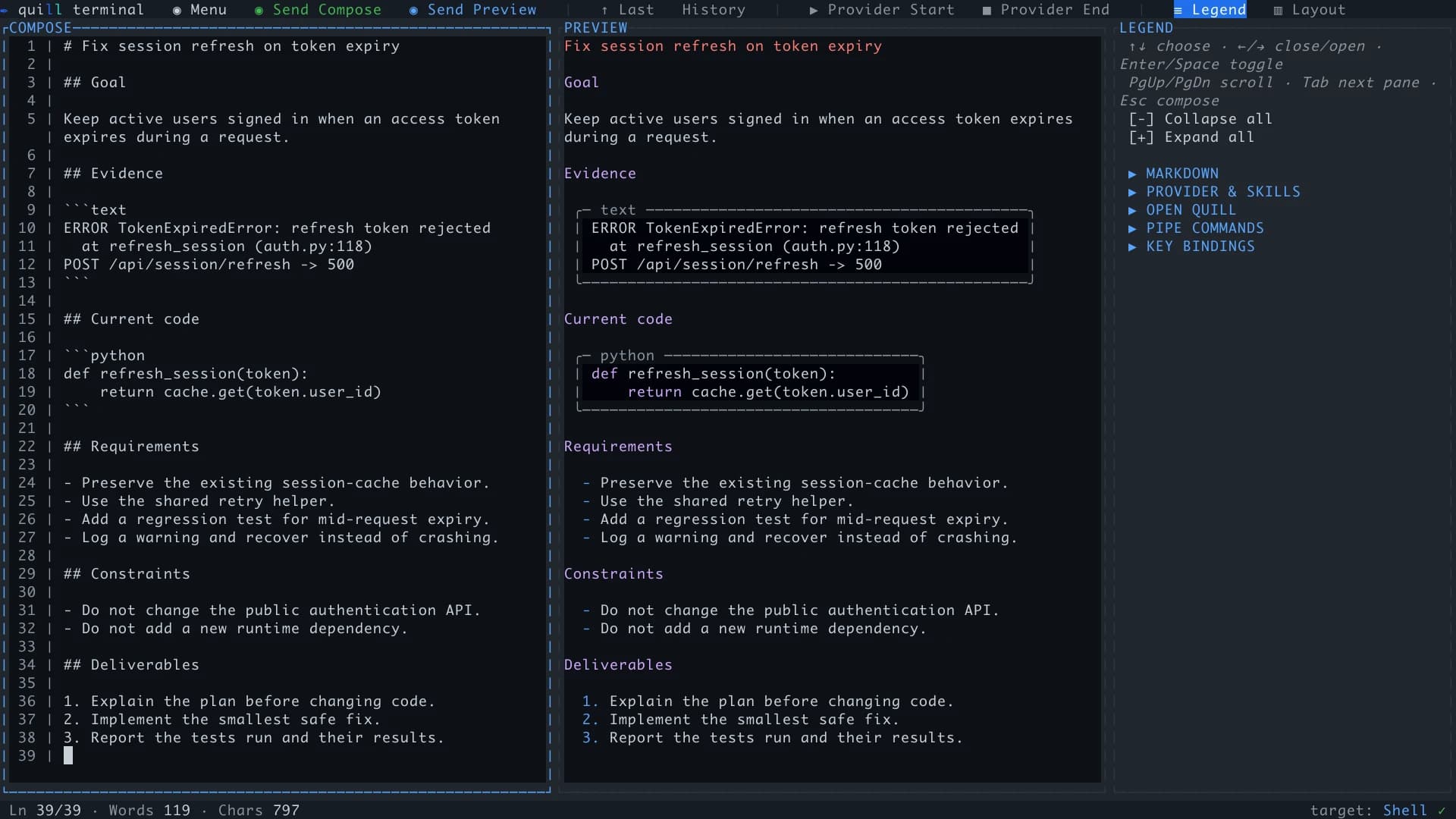
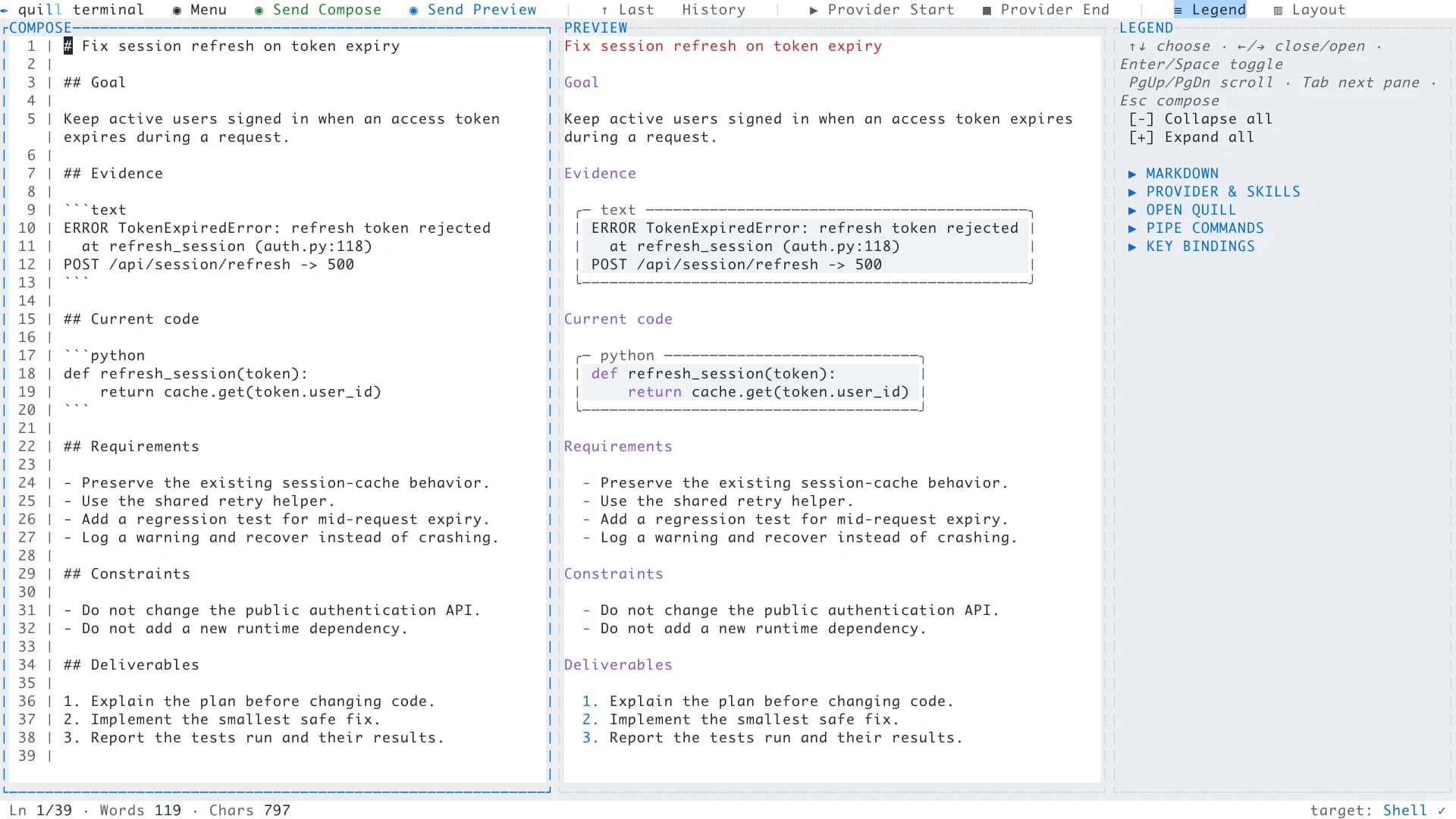
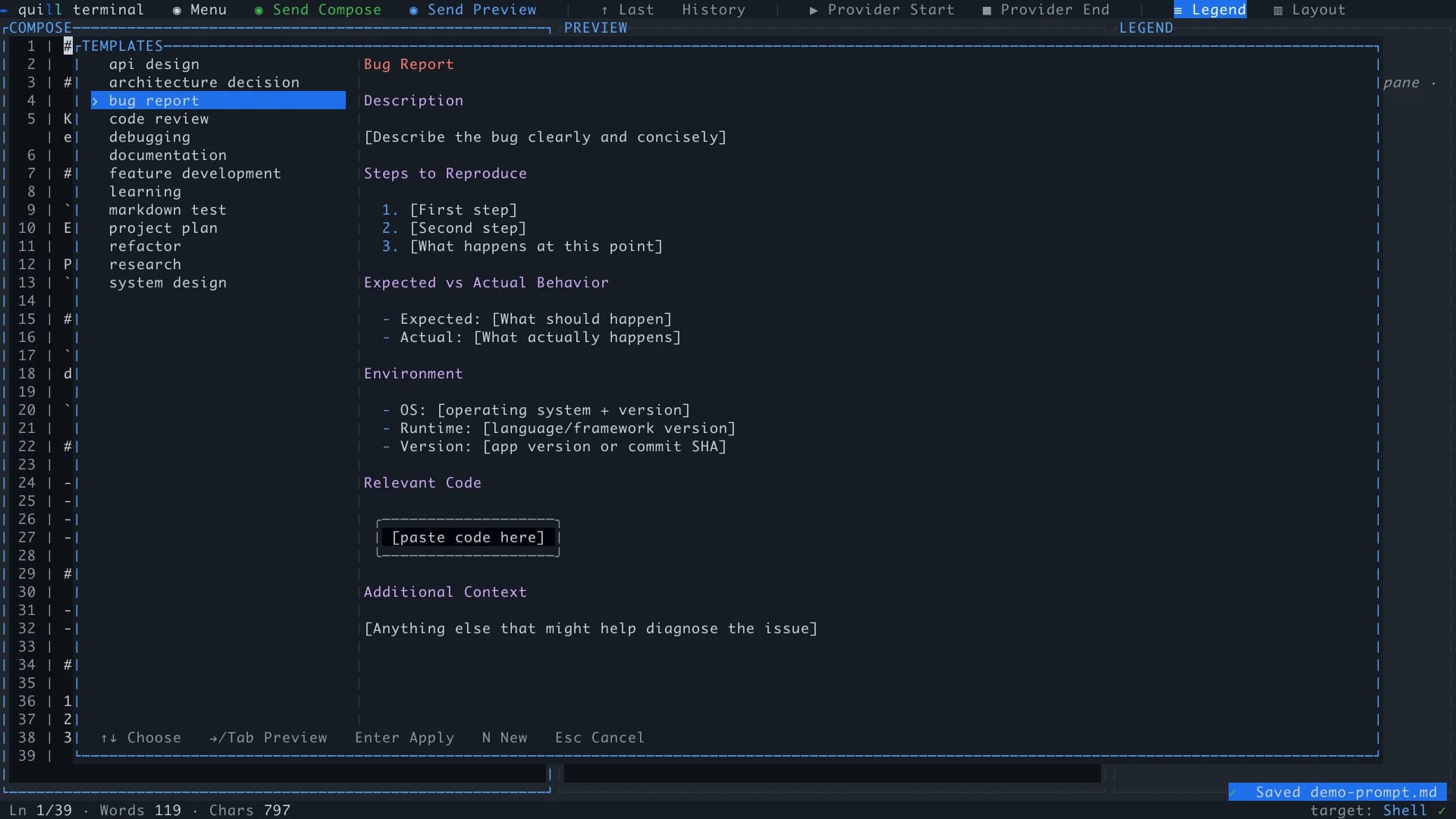
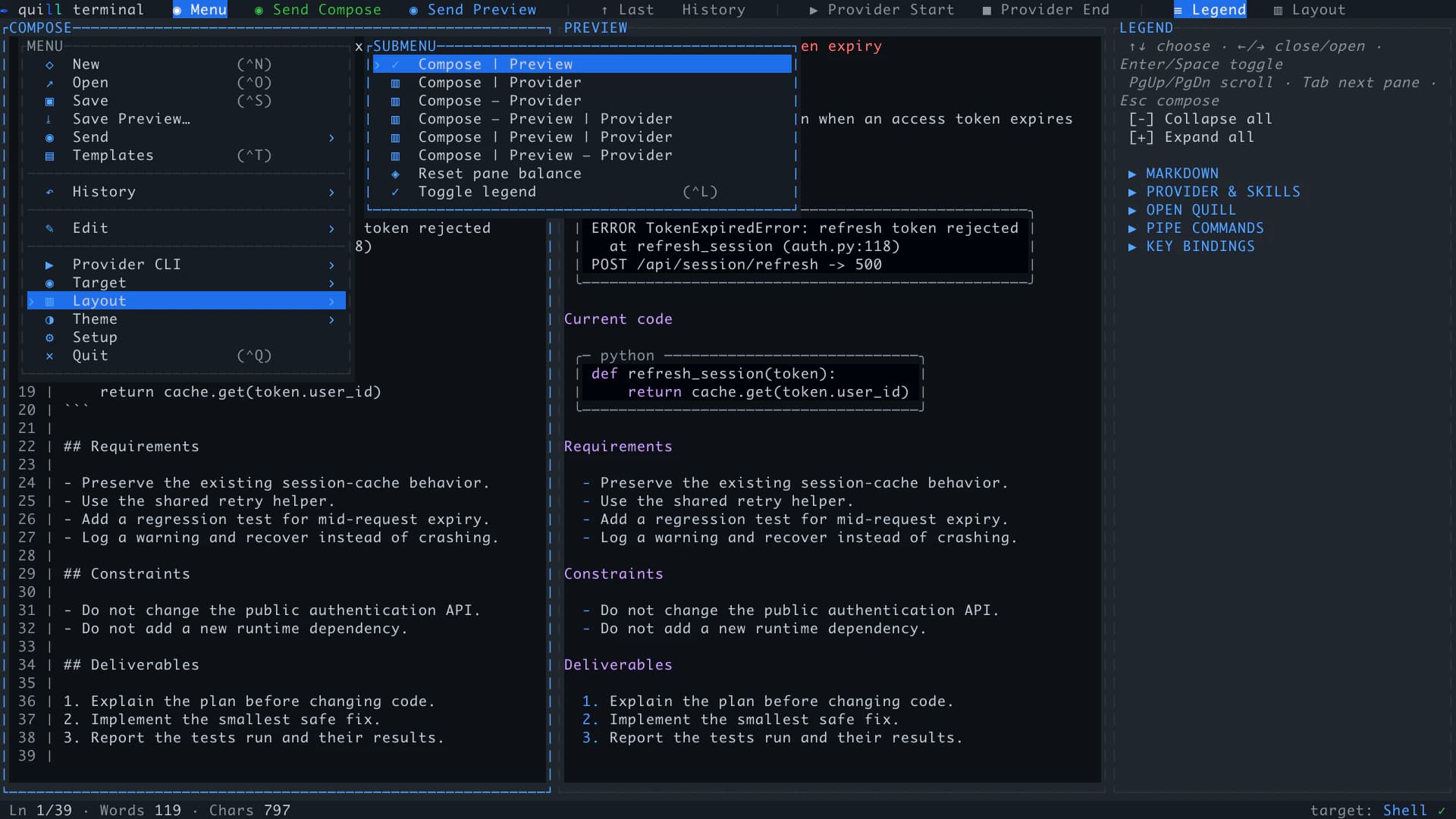
Captured from Quill's current product UI. The matching dark and light palettes below use the same tokens as the website, while Templates and Layout show the real in-app controls.
Compose
A real editor, not a larger input box
Draft, inspect, and refine the whole instruction before it starts an agent run. Quill gives serious prompts the same care you already give code and documents.
Multiline · undo · find
Edit normally, even when the prompt is not
Wrap whole words at the pane edge and move Up or Down by the displayed row—including inside long bullets, numbered lists, and nested items. Tab aligns nested items to the parent marker, empty continued items can switch between bullets and numbers, and mouse selection, cut and paste, undo and redo, find, and smart list continuation stay available.
Ctrl+Tab · F6 · no mouse required
Keep the whole workflow keyboard-first
Reach the top action bar, every menu action, pane, template, history entry, setting, and reading surface from the keyboard. Tab and Enter operate confirmation buttons and Feedback Send as well as ordinary fields. Dedicated launch, stop, top-navigation, and portable pane-navigation keys remain available even when a terminal cannot report enhanced chords.
Compose | Preview
See the structure while you write
Headings, aligned wrapped lists, task lists, tables, links, emphasis, and fenced code render beside the source as you type. Preview follows CommonMark soft- and hard-break rules; fence spacing-sensitive logs, ASCII tables, and diagrams to preserve them literally.
Paste · collapse · undo
Keep large context out of the way
Choose an as-is, plain-text, or Markdown-smart paste. Long logs, API output, queries, and source collapse into readable chips while Preview still renders their complete content. Both send choices resolve the full paste. A paste or incoming pipe is one Undo/Redo action, and copying a complete chip returns its full hidden text.
Lines · words · chars · ~tokens
Track the size of your Compose document
Keep line, word, character, selection, and rough token counts visible while you work. The token estimate is resolved Compose characters divided by four, rounded up, including full collapsed pastes. It excludes conversation history, system prompts, tools, and image tokens; actual API usage is separate.
AGENTS.md · CLAUDE.md · SKILL.md
Edit the files behind agentic work
Open and save prompt files, agent instructions, skills, runbooks, notes, and other Markdown or plain text. Save Preview exports a readable version with complete collapsed text and portable image assets, independently of pane width, while preserving the Compose source and its unsaved state.
Connect
Keep the editor and the execution in one terminal
Compose once, then hand the result to the provider or shell that fits the task. Quill does not replace your tools or model-rewrite the instruction between you and them.
--target · file + target · five routes
Choose from five send targets
Route the instruction to Claude Code, Codex, the Anthropic API, the OpenAI API, or your own shell without model-assisted rewriting. Start with a one-run target—or open a saved file and target together—then change routes without rebuilding the prompt.
Send Compose · Send Preview
Choose source or readable text at send time
Send Compose preserves Markdown source. Send Preview removes heading and emphasis markers while retaining lists, link destinations, and code fences, independently of pane size or scrolling. Save either as the default and keep the other beside it in the top bar. Shell always sends Compose source.
Real PTY · existing login
Run the real coding CLI
Install and authenticate Claude Code or Codex separately, then run it as a full terminal session with its own colors, keybindings, slash commands, scrollback, selection, and copy and paste. Separate Provider Start and Provider End buttons manage the selected CLI or Shell from the top bar.
Streaming · usage · cost
Use provider APIs directly
Anthropic and OpenAI replies stream into a persistent transcript with explicit model discovery, supported reasoning controls, a system prompt, reported token usage, and cost estimates. Verify lists models without sending a completion; selecting a target alone does not read its key. Images travel as structured API attachments, and Quill's model and tuning settings apply to direct APIs.
Six layouts · drag to resize
Arrange the workspace around the task
Place Compose, Preview, and Provider side by side or stack them in six layouts. Drag dividers, rebalance panes, expand only the Legend sections you need, and switch between matching dark and light themes.
Claude Code · Ctrl+G · $VISUAL
Make Quill Claude Code’s external editor
Point VISUAL or EDITOR at Quill, open Claude Code’s external composer, then save and return. The same terminal editor becomes the writing surface for Claude’s own prompt flow.
stdin · stdout · git diff | quill
Pipe command output in—or a live pane out
Pipe a diff, test failure, or build log into Quill at the Compose cursor, append it at the document end, replace the draft, or force a new instance. Export full Compose source, rendered Preview text including collapsed pastes, or the retained native provider transcript to stdout when another command needs it. Nothing is sent automatically.
Reuse
Turn good prompts into durable working material
The useful draft should survive the send button. Keep the instructions, patterns, and project context that are worth improving the next time around.
/ commands · $ skills
Discover real commands and skills
Autocomplete the active CLI's commands and installed Codex skills from the editor—even when Claude or Codex was launched manually inside Quill's Shell. Exact mentions highlight in preview while the underlying prompt remains untouched.
Built-in · custom · Markdown
Start from reusable templates
Use the included task templates or create your own. Custom templates are ordinary Markdown files you can inspect, version, copy, and share without a proprietary format.
Search · reload · export
Keep a local prompt history
The History top-bar button opens searchable sent prompts. With history enabled, Preview sends retain the original Compose source for recall alongside the submitted text and send mode. Reload with Replace or Keep both and undo document replacements during the session. Export history to Markdown, clear it securely, set a retention limit, or disable recording entirely.
Ctrl+↑ · ↑ Last
Recall the last prompt without digging
Bring the most recently sent prompt back into Compose from the keyboard or top bar. An existing draft is guarded with explicit Replace or Keep both choices.
Per repo · resume · recover
Pick up where the work stopped
Launch a CLI in the right directory with saved flags, resume managed Claude or Codex sessions across restarts, and recover unfinished drafts and image chips per workspace. Document-replacement Undo retains up to eight previous documents within a memory budget; it ends when Quill closes. Explicitly discarding a draft on quit removes its recovery copy.
Multiple windows · authenticated handoff
Keep concurrent projects isolated
Run a Quill window per repository. Piped input prefers the matching working directory, live-instance handoff is authenticated locally, and resumable provider sessions can be reopened or safely forked without crossing drafts. Update and restart actions guard the current instance; save other windows separately.
Trust
Local control is part of the product
Quill handles prompts, provider credentials, and terminal processes as working data—not marketing data. The boundaries are explicit and the defaults stay close to your machine.
Browser SSO · signed device lease
Approve the app without sharing a browser session
Sign in with the same Google, GitHub, or email account used on the website. Quill receives a signed, device-bound lease—not your browser cookie or identity-provider password—and applies the same entitlement, expiry, revocation, and device-limit checks as license-key activation. Account shows your access details and offers Refresh account for a current check.
Sanitized provider processes
Do not leak keys into a CLI session
Managed Claude Code and Codex subprocesses launch with provider API-key environment variables removed, keeping direct-API credentials separate from CLI authentication.
Local data · explicit network
Keep the workspace on your machine
Prompts, history, templates, drafts, and session records stay local. Provider keys saved through Setup and Quill's signed license/account state use the OS credential vault. Network access is used for licensing, enabled update and model-metadata checks, key verification, and the provider sends you initiate.
Native · macOS · Windows · Linux
Install a binary, not a runtime stack
Quill ships as a native executable with normal platform installers and no Python, Node.js, or Electron runtime. The command-line installers verify downloaded release checksums. Download now protects unsaved work with Save, Keep recovery, or Cancel and closes Quill safely before opening the download page.
Give the next serious prompt a proper workspace.
Keep your terminal workflow. Add the editor, memory, and control that long prompts and agent instructions deserve.